As much as I like the long, complicated projects that involve weeks of soldering, gluing, coding, tweaking, re-tweaking and debugging, it’s really refreshing to occasionally do something cool with no more than an hour or two of work.
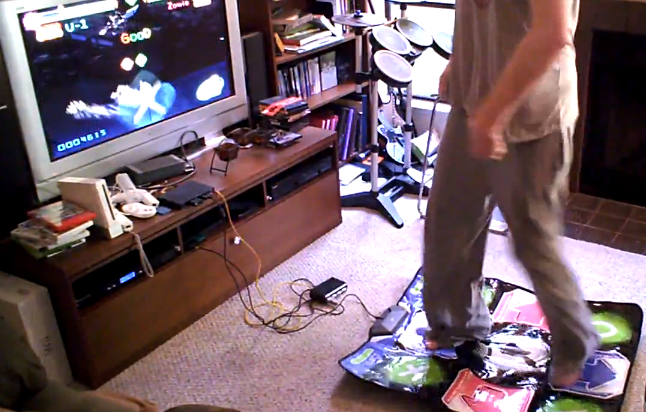
This mini-project was my boyfriend’s idea. It’s an experiment in cooperative two-player Gitaroo Man, played using a gamepad for attack/charge and DDR pad for defense.
For those who aren’t familiar with it, Gitaroo Man is a rhythm game where you do battle using music. You play music on your gitaroo to attack or to charge your health bar. To defend against the enemy’s attacks, you dodge by pressing buttons in time with icons that fly toward the center of the screen. We thought the dodging phase of the game might map well to a DDR pad.
Videos first, tech details below. My boyfriend is on the gamepad, and one of my friends defends with the DDR pad. Theoretically you can play this with one person, but we suck too much at the moment. When we filmed this, we hadn’t played Gitaroo Man in years.. so we definitely could have done better with some more practice :)
Resurrection
https://youtube.com/watch?v=Cp5wrRF4QPg
Bee Jam Blues, Master mode
https://youtube.com/watch?v=_mB1lZ-WlMg
Implementation Details
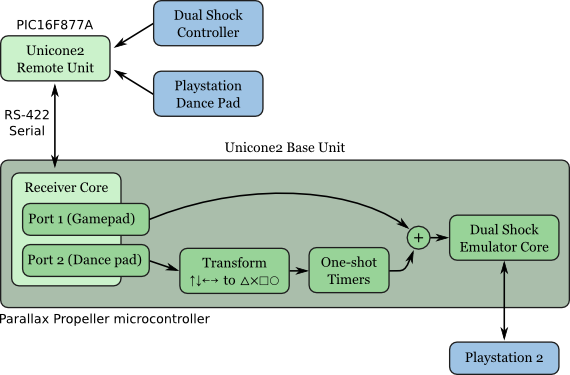
This turned out to be such a quick project because it was really just some special-purpose firmware for my old Unicone2 controller emulator project. The firmware combines inputs from the gamepad and DDR pad, maps the DDR arrows to the buttons used for blocking in Gitaroo Man, and it includes a one-shot timer which converts sustained pressure on a dance pad arrow into a brief tap of the corresponding controller button. This way, standing still on the DDR pad won’t affect your ability to use the controller buttons normally during the attack phase.
Overview of all hardware and software components:
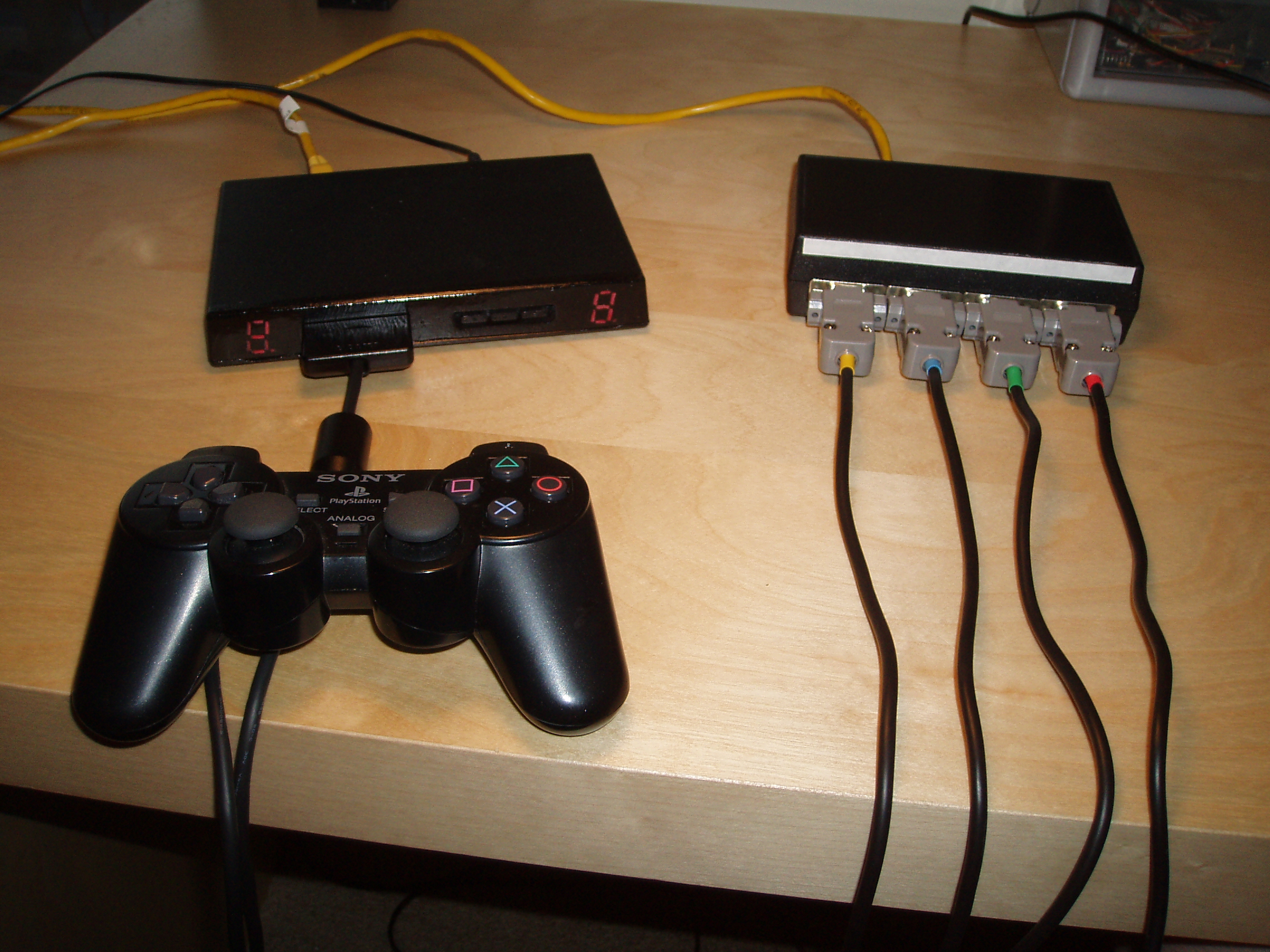
The Unicone2 hardware:
Links:
- Special-purpose firmware source code (navi-misc/unicone2/psx-base/special_gitaroo_ddr.spin)
- Unicone2 Subversion repository
- Gitaroo Man on Wikipedia
- Original post about the Unicone2 (August 2007)
{{
  Special-purpose firmware for the Unicone2 base station:
  This implements a special DDR pad mode for the game Gitaroo Man.

  We use only port 1 on the base unit, and ports 1 and 2 on the
  first remote port. The first port is intended to be used with a
  normal Dual Shock controller, the second port with a DDR pad.

  The normal controller is passed through 1:1 to the base unit.
  On the DDR pad, the D-pad up, down, left, right are mapped to
  triangle, cross, square, circle respectively. So, you can use
  the controller to play the game normally, plus you can use the
  DDR pad to defend.

  Since you're likely to be standing on the pad while attacking too,
  we need a way to prevent those inputs from interfering with the
  attack phase. For this reason, we detect when you first press a
  button on the DDR pad, and simulate just a momentary tap on the
  corresponding controller button. This means you can't use the pad
  to attack.

    - This is configurable by setting TAP_LENGTH. A very long TAP_LENGTH
      has pretty much the same effect as disabling this one-shot functionality.

  TODO: Make this configurable with a button.
        I like using the pad to attack sometimes :)

  -- Micah Dowty <micah@navi.cx>
}}

CON

  _CLKMODE = XTAL1 + PLL16X
  _XINFREQ = 5_000_000

  SLOT_CONTROLLER = 0
  SLOT_DDR = 1

  TAP_LENGTH_MS = 100

OBJ

  Rem : "psx_remote_port"
  RemDummy : "psx_remote_port"
  Emu : "psx_controller_emulator"

VAR
  long  ddr_out_buf[Emu#STATE_BUFFER_LEN]
  long  ddr_stack[64]
  long  tap_length_ticks

PUB Main | remote, slot, emulator, buttons

  ' Start a single remote connection (port 1) and a single
  ' PSX controller emulator core.

  Rem.start(0, 1)
  Emu.start(8, 4, Emu#CONTROLLER_DUAL_SHOCK)

  ' Run a dummy remote unit on port 2, just to display FF on
  ' the LEDs to indicate that you're using the wrong port.

  RemDummy.start(2, 3)
  RemDummy.set_led_char(0, $F)
  RemDummy.set_led_char(1, $F)

  ' Set up the 1:1 mapping for our controller

  Emu.add_state_buffer(Rem.get_state_buffer(SLOT_CONTROLLER))
  Emu.add_actuator_buffer(Rem.get_actuator_buffer(SLOT_CONTROLLER))

  ' For the DDR pad, we use a separate cog to translate the data. That
  ' cog has separate input and output buffers. Tell the emulator about
  ' our output buffer. The emulator cog will merge this with
  ' the data from our controller above.

  Emu.add_state_buffer(@ddr_out_buf)

  ' Start a separate cog to translate the DDR buttons quickly
  cognew(ddr_thread, @ddr_stack)

  ' Main loop for less time-critical things: Send low-frequency data back to
  ' the remote unit (LED and force feedback state).

  repeat
    update_controller_leds
    update_ddr_out_leds
    Rem.poll
    RemDummy.poll


PRI ddr_thread | ddr_in_ptr, ddr_buttons, out_buttons, ddr_buttons_prev, timers[4]

  ' Just a tight loop to translate DDR pad data to appropriate controller data

  tap_length_ticks := clkfreq / 1000 * TAP_LENGTH_MS

  ' Default state for the output buffer (Axes centered, buttons up)
  bytefill(@ddr_out_buf, 0, Emu#STATE_BUFFER_LEN)
  bytefill(@ddr_out_buf, $80, 6)
  bytefill(@ddr_out_buf, $ff, 2)

  ddr_in_ptr := Rem.get_state_buffer(SLOT_DDR)
  repeat
    ddr_buttons_prev := ddr_buttons
    ddr_buttons := !WORD[ddr_in_ptr]
    out_buttons := 0

    if button_tap(ddr_buttons, ddr_buttons_prev, Rem#BTN_UP, @timers[0])
      out_buttons |= Rem#BTN_TRIANGLE

    if button_tap(ddr_buttons, ddr_buttons_prev, Rem#BTN_DOWN, @timers[1])
      out_buttons |= Rem#BTN_X

    if button_tap(ddr_buttons, ddr_buttons_prev, Rem#BTN_LEFT, @timers[2])
      out_buttons |= Rem#BTN_SQUARE

    if button_tap(ddr_buttons, ddr_buttons_prev, Rem#BTN_RIGHT, @timers[3])
      out_buttons |= Rem#BTN_CIRCLE

    WORD[@ddr_out_buf] := !out_buttons

PRI button_tap(current, prev, mask, timer_ptr) : out | timediff
  ' Utility function to handle emitting a short tap any time an
  ' incoming button press is detected. We release the output button
  ' when TAP_LENGTH elapses, or when the original button is released.

  if current & mask
    if prev & mask
      ' Button held down. Check timer
      timediff := cnt - LONG[timer_ptr]
      if timediff <= 0
        ' Timer hasn't expired
        out~~
      else
        ' Timer expired. Move the timer forward so it doesn't wrap.
        out~
        LONG[timer_ptr] := cnt
    else
      ' Button just pressed. Set timer.
      out~~
      LONG[timer_ptr] := cnt + tap_length_ticks
  else
    ' Button not pressed
      out~

PRI update_controller_leds | state, x, y, magnitude, slope, leds

  ' On the controller slot's LEDs, display the approximate angle of the analog stick.

  state := Rem.get_state_buffer(SLOT_CONTROLLER)
  x := BYTE[state + Rem#AXIS_LX] - $80
  y := BYTE[state + Rem#AXIS_LY] - $80

  magnitude := x * x + y * y
  if y <> 0
    slope := (x << 8) / y
  else
    slope := $7FFFFF

  if magnitude < 600
    ' Dead zone. LEDs are blank.
    leds := 0
  elseif x > 0
    ' Right half (+x)
    if slope > $100
      leds := $04   ' Upper right
    elseif slope > 0
      leds := $02   ' Bottom
    elseif slope > -$100
      leds := $20   ' Top
    else
      leds := $10   ' Lower right
  else
    ' Left half (-x)
    if slope > $100
      leds := $40   ' Lower left
    elseif slope > 0
      leds := $20   ' Top
    elseif slope > -$100
      leds := $02   ' Bottom
    else
      leds := $01   ' Upper left

  Rem.set_led_segments(SLOT_CONTROLLER, leds)

PRI update_ddr_in_leds | buttons, leds

  ' On the DDR slot's LEDs, display which pads are pressed.
  ' This version shows the inputs from the pad.

  buttons := !WORD[Rem.get_state_buffer(SLOT_DDR)]
  leds := 0

  if buttons & Rem#BTN_UP
    leds |= $20
  if buttons & Rem#BTN_DOWN
    leds |= $02
  if buttons & Rem#BTN_LEFT
    leds |= $41
  if buttons & Rem#BTN_RIGHT
    leds |= $14

  Rem.set_led_segments(SLOT_DDR, leds)

PRI update_ddr_out_leds | buttons, leds

  ' On the DDR slot's LEDs, display which pads are pressed.
  ' This version shows the outputs after translation.

  buttons := !WORD[@ddr_out_buf]
  leds := 0

  if buttons & Rem#BTN_TRIANGLE
    leds |= $20
  if buttons & Rem#BTN_X
    leds |= $02
  if buttons & Rem#BTN_SQUARE
    leds |= $41
  if buttons & Rem#BTN_CIRCLE
    leds |= $14

  Rem.set_led_segments(SLOT_DDR, leds)