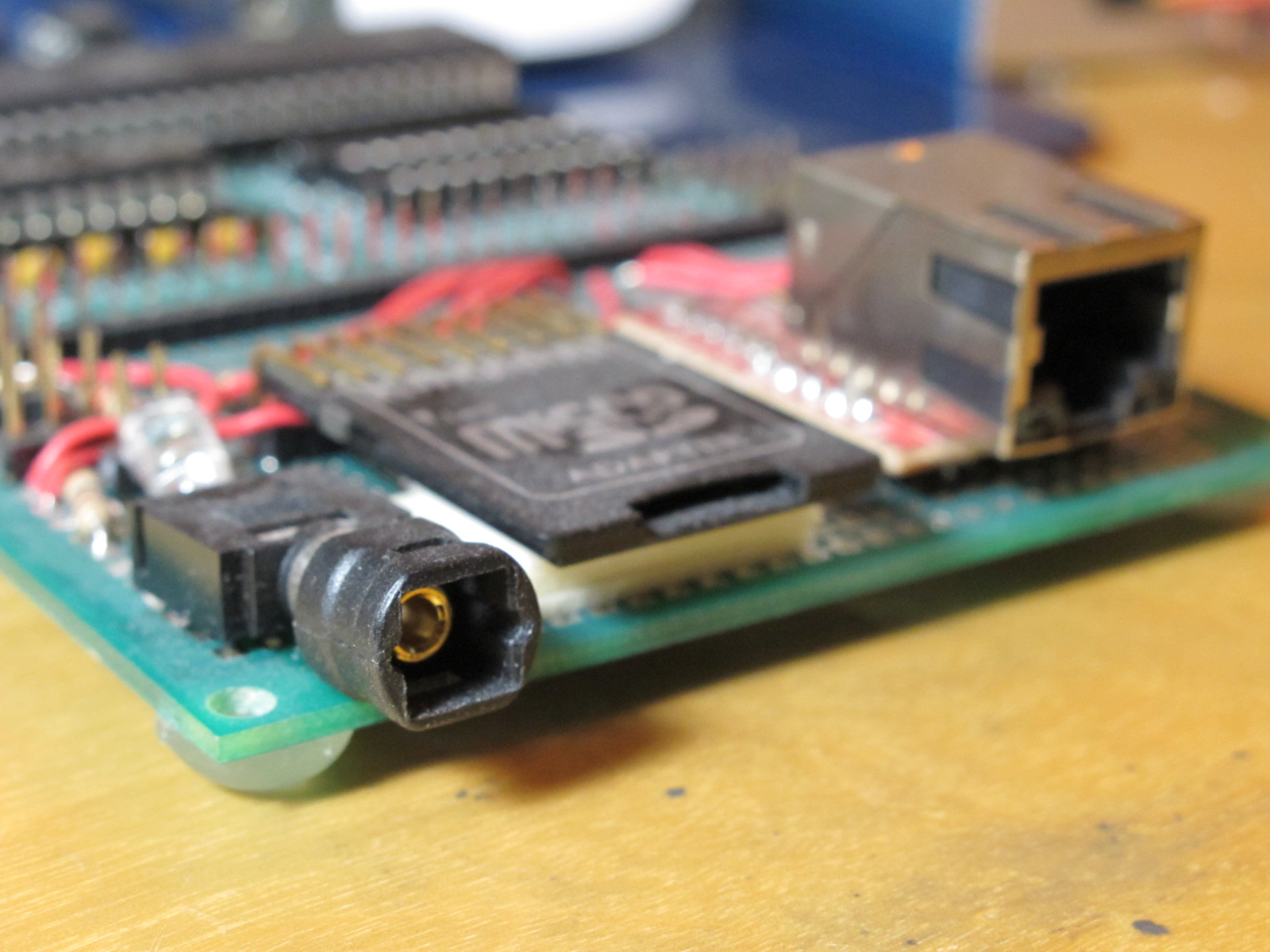
So, kind of on a random whim, I decided to build a software SPDIF encoder for the Propeller chip. It was an interesting challenge, and the results are pretty cool, but now I have no idea what do do with it. Not an uncommon problem for me, I guess…
Maybe I’ll give my Propeller board an Ethernet port and build a Squeezebox-on-a-chip.
Update: Ok, so maybe that’s not such a crazy idea.. (or is it?) Anyway, I just found this, and I had to order a couple:
[Ethernet Interface Board – ENC28J60]
Now if only there was a simple way to capture all sound output from a Windows/Linux/Mac machine and stream it over the network… The ESD protocol doesn’t count :P
{{
spdifOut v1.0 2008/07/26
-------------------------
This is an object for the Parallax Propeller, implementing an
S/PDIF (digital audio) output driver. We stream PCM data from
hub memory to a single output pin, which can be connected to
a suitable output driver (for coax) or to an LED (for Toslink
optical).
The audio source can be written in either Spin or assembly.
The input buffer is flexible: you supply a start address and
buffer size, this object provides a sample counter for flow
control purposes.
A buffer size of 1 and no counter can be used if you want the
SPDIF object to just poll a single hub memory location for
audio data. If you want flow control, you can use the counter
to test when the current sample has been output. You can use
this system to implement a full lockless FIFO queue, or a
double-buffering scheme- whichever method works best for your
application.
We use the Propeller's video output engine to generate the
S/PDIF signal. This means our output frequency is as flexible
as the Propeller's counter PLLs, and we can generate very high
output data rates. It also means that not all pins can be used
as S/PDIF outputs. Pins 3, 7, 11, 15, 19, 23, 27, and 31 can't
be used, as they are reserved for the aural subcarrier.
The S/PDIF bit rate is 64x the sample rate (2 subframes, each
with 32 bit positions). We need two video clocks per bit, for
the biphase mark encoding. This means our final video "pixel"
clock needs to be 128x the sampleHz rate. At 48kHz, this gives
us a "pixel" clock of 6.144 MHz. To get into the right frequency
range for our PLL, we run the PLL at 16x this frequency. For
48 KHz, this is a PLL frequency of 98 MHz. So, our PLL frequency
is always 2048x the audio sample rate, and we use a 16x divisor.
References:
http://en.wikipedia.org/wiki/S/PDIF
http://en.wikipedia.org/wiki/AES/EBU
http://en.wikipedia.org/wiki/Biphase_mark_code
http://www.ebu.ch/CMSimages/en/tec_AES-EBU_eg_tcm6-11890.pdf
http://www.epanorama.net/documents/audio/spdif.html
http://www.users.qwest.net/~kmaxon/page/side/control61_137.htm
http://opencores.org/projects.cgi/web/spdif_interface/overview
┌───────────────────────────────────┐
│ Copyright (c) 2008 Micah Dowty │
│ See end of file for terms of use. │
└───────────────────────────────────┘
}}
CON
' Channel status bits
PROFESSIONAL_MODE = 1 << 0 ' Is this professional or consumer audio?
NON_AUDIO = 1 << 1 ' Set if this is not regular PCM audio.
ALLOW_COPIES = 1 << 2 ' Set if no copy protection is enforced.
PRE_EMPHASIS = 1 << 3 ' Audio pre-emphasis enabled?
PRE_RECORDED_DATA = 1 << 15 ' Generation status. Is this pre-recorded data?
HZ_44100 = 0 << 24
HZ_OTHER = 1 << 24
HZ_48000 = 2 << 24
HZ_32000 = 3 << 24
DEFAULT_STATUS = ALLOW_COPIES | HZ_44100
VAR
byte cog
long counter
PUB start(pin) : okay
'' Start an S/PDIF driver on the specified pin. Uses one cog,
'' returns nonzero on success.
''
'' You must call setBuffer() before start(), and you may optionally
'' call setChannelStatus().
param_pin := pin
param_counter := @counter
counter~
okay := cog := 1 + cognew(@entry, 0)
PUB stop
if cog > 0
cogstop(cog - 1)
cog~
PUB setChannelStatus(status)
'' Set the first 32 channel status bits. This implicitly sets the
'' sample rate. Must be called before start()
param_status := status
PUB setBuffer(addr, size)
'' Tell the S/PDIF driver to continuously read samples from a
'' circular buffer of 'size' samples, starting at 'addr'.
param_input := param_in_begin := addr
param_in_end := addr + (size << 2)
PUB getCountAddr
'' Get the address of a counter long, which increments immediately after
'' the driver cog reads a new sample from the buffer. This address can
'' be used by other assembly-language cogs for fine-grained flow control.
'' To find the driver's current position in the sample buffer, take this
'' value modulo the buffer size.
return @counter
PUB getCount
'' Return the number of samples that have been processed.
return counter
DAT
'==============================================================================
' Driver Cog
'==============================================================================
org
'======================================================
' Initialization
'======================================================
entry
mov r1, d44100 ' Decode sample rate, in hz
test param_status, hz_bit1 wz
if_nz mov r1, d48000
test param_status, hz_bit0 wz
if_nz mov r1, d32000
shl r1, #7 ' 128x CTRA * 16x PLL = 2048x
rdlong r2, #0 ' Read system CLKFREQ
mov r0, #32+1 ' r3 = 2^32 * r1 / r2
:divLoop cmpsub r1, r2 wc
rcl r3, #1
shl r1, #1
djnz r0, #:divLoop
mov frqa, r3 ' Program CTRA frequency
movi ctra, #%00001_011 ' PLL mode, divide by 16 (128x sample rate)
mov vscl, init_vscl ' Init VScl for one clock per 'pixel'
mov r0, #1 ' Calculate DIRA
shl r0, param_pin
mov dira, r0
mov r0, param_pin ' Calculate VPins
and r0, #%111
mov r1, #1
shl r1, r0
mov vcfg, r1
mov r0, param_pin ' Calculate VGroup
shr r0, #3
movd vcfg, r0
test param_pin, #4 wz ' Which half of the pin group are we in?
if_z movi vcfg, #%010_000_000 ' Baseband on 3:0
if_nz movi vcfg, #%011_000_000 ' Baseband on 7:4
'======================================================
' Main loop
'======================================================
mainLoop
' Begin a new data block
mov preamble_left, preamble_b
' First channel status word, settable by the caller.
mov channel_status, param_status
call #genFrames32
' Other bits are reserved, unused for consumer audio.
' There are a total of 192 bits (6 words)
mov channel_status, #0
call #genFrames32
mov channel_status, #0
call #genFrames32
mov channel_status, #0
call #genFrames32
mov channel_status, #0
call #genFrames32
mov channel_status, #0
call #genFrames32
jmp #mainLoop
'======================================================
' Frame generator
'======================================================
' This outputs a group of 32 frames. Each frame gets
' one bit of channel status data from the "channel_status"
' shift register.
'
' Note that both subframes in a frame get the same bit
' of channel status data.
genFrames32
mov frame, #32
:loop
rdlong sample, param_input ' Read audio sample from hub memory
add param_input, #4 ' Next sample
add counter_reg, #1 ' Update sample counter, wrap buffer
wrlong counter_reg, param_counter
cmp param_input, param_in_end nr,wz
if_z mov param_input, param_in_begin
mov subframe, sample ' Left channel (high word) to subframe bits 23:8
shr subframe, #16
shl subframe, #8
rcr channel_status, #1 wc, nr ' Insert channel status and parity
muxc subframe, status_mask wc ' Note that the parity bit should cause the entire
muxc subframe, parity_mask ' biphase-encoded subframe to have an even number of
' bit transitions, so each subframe should end at the
' same logic level.
mov preamble, preamble_left ' Output left subchannel
call #bmEncode
mov subframe, sample ' Right channel (low word) to subframe bits 23:8
shl subframe, #16
shr subframe, #8
rcr channel_status, #1 wc ' Insert channel status and parity
muxc subframe, status_mask wc
muxc subframe, parity_mask
mov preamble, preamble_w ' Output right subchannel
call #bmEncode
' Next frame..
mov preamble_left, preamble_m
djnz frame, #:loop
genFrames32_ret ret
'======================================================
' Biphase Mark Encoder
'======================================================
bmEncode
' Fill the biphase encoding buffer with the value of the
' last cell we just output. If we just sent a '0', every bit
' in the buffer will be a '0', etc. This provides continuity
' from subframe to subframe. We never set bits explicitly in
' the biphase buffer, we just introduce transitions using XOR.
rcl biphase, #1 wc ' Extract high bit (the last bit we sent)
muxc biphase, hFFFFFFFF ' Set all bits
' Load the preamble. The preamble is not biphase encoded,
' but it is subject to being inverted if the previous cell
' was a 1. This step is omitted for the second half (second
' 32 cells) of a subframe.
'
' In biphase encoding, every bit unconditionally begins with
' one transition. We can add these transitions too, in the same
' operation.
'
' The masks below select all cels in the biphase register that are
' output after the bit we're currently encoding. Any time we
' XOR the biphase register with the mask, we're creating a
' transition on all future bits. The mask starts at the first
' odd numbered non-preamble bit.
xor biphase, preamble
' To actually biphase encode our input data, we'll insert
' additional transitions every time there's a 1 bit in our input.
' For the first half of the subframe, we're processing 12 bits
' of subframe data. (16, minus the 4-bit preamble)
'
' The loop is unrolled, since this is very speed-critical. At
' 48 KHz, we have less than three instructions per bit!
rcr subframe, #1 wc ' Extract the next LSB from the subframe
if_nc xor biphase, mask_4 ' Insert a transition only for '1' bits.
rcr subframe, #1 wc
if_nc xor biphase, mask_5
rcr subframe, #1 wc
if_nc xor biphase, mask_6
rcr subframe, #1 wc
if_nc xor biphase, mask_7
rcr subframe, #1 wc
if_nc xor biphase, mask_8
rcr subframe, #1 wc
if_nc xor biphase, mask_9
rcr subframe, #1 wc
if_nc xor biphase, mask_10
rcr subframe, #1 wc
if_nc xor biphase, mask_11
rcr subframe, #1 wc
if_nc xor biphase, mask_12
rcr subframe, #1 wc
if_nc xor biphase, mask_13
rcr subframe, #1 wc
if_nc xor biphase, mask_14
rcr subframe, #1 wc
if_nc xor biphase, mask_15
waitvid palette, biphase ' Output the first half of this subframe
' Get ready to do that again.. this time we won't
' output a preamble, but we'll output the next 16 bits
' of the subframe data.
rcl biphase, #1 wc
muxc biphase, hFFFFFFFF
xor biphase, h55555555
rcr subframe, #1 wc
if_nc xor biphase, mask_0
rcr subframe, #1 wc
if_nc xor biphase, mask_1
rcr subframe, #1 wc
if_nc xor biphase, mask_2
rcr subframe, #1 wc
if_nc xor biphase, mask_3
rcr subframe, #1 wc
if_nc xor biphase, mask_4
rcr subframe, #1 wc
if_nc xor biphase, mask_5
rcr subframe, #1 wc
if_nc xor biphase, mask_6
rcr subframe, #1 wc
if_nc xor biphase, mask_7
rcr subframe, #1 wc
if_nc xor biphase, mask_8
rcr subframe, #1 wc
if_nc xor biphase, mask_9
rcr subframe, #1 wc
if_nc xor biphase, mask_10
rcr subframe, #1 wc
if_nc xor biphase, mask_11
rcr subframe, #1 wc
if_nc xor biphase, mask_12
rcr subframe, #1 wc
if_nc xor biphase, mask_13
rcr subframe, #1 wc
if_nc xor biphase, mask_14
rcr subframe, #1 wc
if_nc xor biphase, mask_15
waitvid palette, biphase ' Output the second half of this subframe
bmEncode_ret ret
'------------------------------------------------------------------------------
' Initialized Data
'------------------------------------------------------------------------------
hFFFFFFFF long $FFFFFFFF
h55555555 long $55555555
d44100 long 44100
d48000 long 48000
d32000 long 32000
hz_bit0 long HZ_OTHER
hz_bit1 long HZ_48000
param_status long DEFAULT_STATUS
param_pin long 0
param_input long 0
param_in_begin long 0
param_in_end long 0
param_counter long 0
counter_reg long 0
' 1 clock per 'pixel', 32 clocks per 'frame'.
init_vscl long (1 << 12) | 32
' Our "palette". Since our actual output pin could be any of
' the three video D/A pins, and we run the video hardware in
' 1-bit mode, this is just an identity mapping that lets us use
' the video generator as a dumb shift register.
palette long $07_00
' Subframe bits
status_mask long 1 << (30 - 4)
parity_mask long 1 << (31 - 4)
' S/PDIF preambles. These are ordered LSB-first, ready for loading into
' 'biphase' before encoding the rest of a subframe.
'
' These are the preamble encodings that occur after a '0' bit. After a '1'
' bit, these preambles are inverted.
'
' All odd-numbered unused bits must be '1', so we can insert the fixed
' transitions in the same operation.
preamble_b long %010101010101010101010101_00010111
preamble_m long %010101010101010101010101_01000111
preamble_w long %010101010101010101010101_00100111
' For speed, we precalculate all XOR masks.
mask_0 long %11111111111111111111111111111110
mask_1 long %11111111111111111111111111111000
mask_2 long %11111111111111111111111111100000
mask_3 long %11111111111111111111111110000000
mask_4 long %11111111111111111111111000000000
mask_5 long %11111111111111111111100000000000
mask_6 long %11111111111111111110000000000000
mask_7 long %11111111111111111000000000000000
mask_8 long %11111111111111100000000000000000
mask_9 long %11111111111110000000000000000000
mask_10 long %11111111111000000000000000000000
mask_11 long %11111111100000000000000000000000
mask_12 long %11111110000000000000000000000000
mask_13 long %11111000000000000000000000000000
mask_14 long %11100000000000000000000000000000
mask_15 long %10000000000000000000000000000000
'------------------------------------------------------------------------------
' Uninitialized Data
'------------------------------------------------------------------------------
r0 res 1
r1 res 1
r2 res 1
r3 res 1
' This is the 32-bit S/PDIF subframe, before biphase encoding. Bits 0-3, the
' preamble, are totally omitted from this packet. Bit 0 in this field is actually
' bit 4 in the standard S/PDIF subframe.
'
' The S/PDIF subframe format:
'
' Bits 0-3: Preamble (Not present, since it's inserted after biphase encoding)
' 4-7: Auziliary audio data bits (for nonstandard 24-bit audio)
' 8-11: Unused audio bits, for 20-bit sound
' 12-27: 16-bit audio sample
' 28: Invalid frame bit (normally zero)
' 29: Subcode data (for ASCII text, and other odd features)
' 30: Channel status bit (see 'channel_status', above)
' 31: Even parity, not including preamble
subframe res 1
biphase res 1
preamble res 1
preamble_left res 1
frame res 1
sample res 1
channel_status res 1
fit
{{
┌──────────────────────────────────────────────────────────────────────────────────────────────────────────────────────────────┐
│ TERMS OF USE: MIT License │
├──────────────────────────────────────────────────────────────────────────────────────────────────────────────────────────────┤
│Permission is hereby granted, free of charge, to any person obtaining a copy of this software and associated documentation │
│files (the "Software"), to deal in the Software without restriction, including without limitation the rights to use, copy, │
│modify, merge, publish, distribute, sublicense, and/or sell copies of the Software, and to permit persons to whom the Software│
│is furnished to do so, subject to the following conditions: │
│ │
│The above copyright notice and this permission notice shall be included in all copies or substantial portions of the Software.│
│ │
│THE SOFTWARE IS PROVIDED "AS IS", WITHOUT WARRANTY OF ANY KIND, EXPRESS OR IMPLIED, INCLUDING BUT NOT LIMITED TO THE │
│WARRANTIES OF MERCHANTABILITY, FITNESS FOR A PARTICULAR PURPOSE AND NONINFRINGEMENT. IN NO EVENT SHALL THE AUTHORS OR │
│COPYRIGHT HOLDERS BE LIABLE FOR ANY CLAIM, DAMAGES OR OTHER LIABILITY, WHETHER IN AN ACTION OF CONTRACT, TORT OR OTHERWISE, │
│ARISING FROM, OUT OF OR IN CONNECTION WITH THE SOFTWARE OR THE USE OR OTHER DEALINGS IN THE SOFTWARE. │
└──────────────────────────────────────────────────────────────────────────────────────────────────────────────────────────────┘
}} ''
'' Simple demo for playing a WAV file via SPDIF, with double-buffering.
'' This demo is really dumb, and it doesn't understand WAV headers at all-
'' we just treat the whole file like it's a raw 16-bit signed stereo PCM
'' file at 44.1 KHz.
''
'' -- Micah Dowty <micah@navi.cx>
''
'' Configure these parameters for your particular setup:
CON
_clkmode = xtal1 + pll16x
_xinfreq = 5_000_000
SPDIF_PIN = 25
SD_CARD_PIN = 16
DAT
filename byte "somerslt.wav", 0
OBJ
sd : "fsrw"
spdif : "spdifOut"
CON
BUFFER_SIZE = 128 ' Must be a power of two
VAR
long bufA[BUFFER_SIZE]
long bufB[BUFFER_SIZE]
PUB main | f, c
if sd.mount(SD_CARD_PIN)
panic
if sd.popen(@filename, "r")
panic
spdif.setBuffer(@bufA, constant(BUFFER_SIZE * 2))
spdif.start(SPDIF_PIN)
repeat
' Wait until the driver is using bufB, then read bufA
repeat until spdif.getCount & BUFFER_SIZE
sd.pread(@bufA, constant(BUFFER_SIZE * 4))
' Now the opposite...
repeat while spdif.getCount & BUFFER_SIZE
sd.pread(@bufB, constant(BUFFER_SIZE * 4))
PUB panic
'' If an SD card error occurs, blink the SPDIF output LED forever.
dira[SPDIF_PIN]~~
repeat
waitcnt(clkfreq/10 + cnt)
!outa[SPDIF_PIN]git clone https://git.approximate.life/navi-misc.git